
Formatting Citekeys
bibiman offers the possibility to create new citekeys from the fields of
BibLaTeX entries. This is done using an easy but powerful pattern-matching
syntax.
Settings
All settings for the citekey generation have to be configured in the used config
file. The regular path is XDG_CONFIG_DIR/bibiman/bibiman.toml. But it can be
set dynamically with the -c/--config= global option.
Following values can be set through the config file. A detailed explanation for all fields follows below:
[citekey_formatter]
fields = [ "author;2;;-;_", "title;3;6;_;_", "year" ]
case = "lowercase"
ascii_only = true
ignored_chars = [
    '?', '!', '\\', '\'', '.', '-', '–', ':', ',', '[', ']', '(', ')', '{', '}', '§', '$', '%',
    '&', '/', '`', '´', '#', '+', '*', '=', '|', '<', '>', '^', '°', '_', '"', '»', '«', '‘', '’',
    '“', '”',
]
ignored_words = [
    "the",
    "a",
    "an",
    "of",
    "for",
    "in",
    "at",
    "to",
    "and",
    "der",
    "die",
    "das",
    "ein",
    "eine",
    "eines",
    "des",
    "auf",
    "und",
    "für",
    "vor",
]
Building Patterns
The main aspect for generating citekeys are the field patterns. They can be set through an array in the config file where every array-item represents a single BibLaTeX field to be used for generating a part of the citekey.
Every field pattern consists of the following five parts separated by semicolons. The general pattern looks like this (every subfield is explained below):
biblatex field name ; max word count ; max char count ; inner delimiter ; trailing delimiter
- BibLaTeX field: the first part represents the field name which value
should be used to generate the content part of the citekey. Theoretically, any
BibLaTeX field can be selected by name. But there are some fields which are
much more common than others; e.g.
author,editor,title,year/dateorentrytype. Those very common fields are preprocessed; meaning that for instance LaTeX macros are fully stripped from the strings, or thateditoris a fallback value forauthorif the latter is empty (however, settingeditorexplicitly is still possible). Also usingyearwill parse thedatefield too, to ensure a year number. - Max Word: Defines how many words should maximal be used from the named
field. E.g. if the title consists of five words, and the max counter is set to
3only the first three fields will be used. - Max Chars/Word: Defines how many chars, counting from the start, of each
word will be used to build the citekey. If for instance the value is set to
5, only the first five chars of any word will be used. Thus, "archaeology" would be stripped down to "archa". - Inner Delimiter: Sets the delimiter char used between words from the
currently named field; e.g. to separate the words of the
titlefield. - Trailing Delimiter: Sets the delimiter which separates the current fields value from the following. This delimiter is only printed if the following field has some content.
For example, to use the title field, print maximal three words and of those
only the first five chars, single words separated by underscore and the whole
field separated by equal sign, insert the following pattern field into the
fields array:
title;3;5;_;=
Except the BibLaTeX field name, all other parts of the pattern can be left
blank. If the field name is the only value set, semicolon delimiters are also
not necessary. But if only one of the following parts should be set, all
delimiters need to be used. E.g. those are both valid: title or title;;;_;=.
The first would print all words of the title, no matter the length, not
separated by any char. The last would also print all words of the title, but
single words separated by underscores and the whole pattern value separated from
the following by an equal sign. This is not valid: title;;_ since bibiman
can't know if the underscore means a delimiter (and which) or the max char
count.
The pattern array inside the config file takes multiple pattern fields like the predecing. This allows an elaborated citekey pattern which takes into account multiple fields.
Ignore Lists and Char Case
Beside the field patterns there are some other options to define how citekeys should be built.
ascii_only=<BOOL>
: If set to true, which is the default, non-ascii chars are mapped to their
ascii equivalent. For example, the German ä would be mapped to a. The
Turkish ş or Greek σ/ς would be mapped to s. If set to false all are
kept as they are. But this could lead to errors running LaTeX on the file.
case=<CASE>
: If used, sets the case of the chars in the citekey. Valid values are
uppercase, lowercase or camelcase. Both first should be clear, the
latter means typical camel case also beginning the first word with an
uppercase letter; also referenced as upper camel case or Pascal case.
ignored_chars=<ARRAY>
: Defines chars which should be ignored during parsing (meaning not print them).
The default list contains 33 special chars and is part of the default config
file (in out-commented state). Be aware, setting this key will completely
overwrite the default list!
ignored_words=<ARRAY>
: A list of words which should be ignored parsing field values. The default list
contains about 20 very commonly used words in English and German; like
articles, pronouns or connector words. Like with ignored_chars setting this
key will completely overwrite the default list!
General Tipps
- Most importantly: always use the
--dry-runoption first! This will print a list of old and new values for all citekeys in the file without changing anything. For the test file of this repo and using the pattern from the section below--dry-runproduces the following output: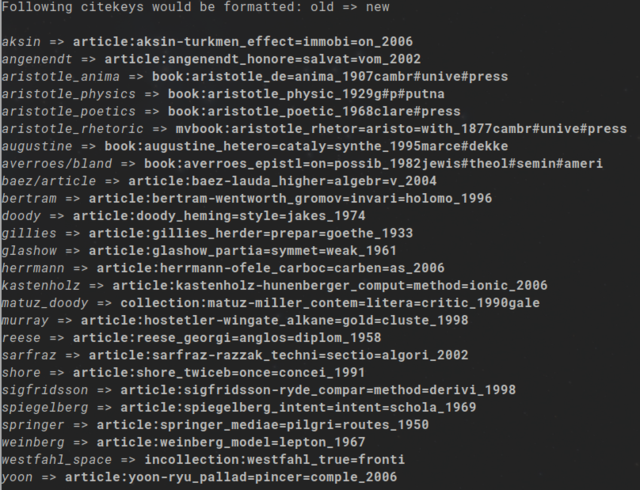
- After finding a good overall pattern, use the
--output=option to create a new file and don't overwrite your existing file. Thus, your original file isn't broken if the key formatter produces some unwanted output. - Its possible to update citekey based PDF and note files directly when
formatting the citekeys using the
-u/--update-attachmentsoption. Thus, all PDFs and notes are already linked to the correct entries after updating the citekeys. Since this operation can break things, use it with--dry-runfirst. As with regular citekeys this will print all changes without processing anything. - Even very long patterns are possible, they are not encouraged, since it bloats the bibfiles.
- The same accounts for too short patterns; if the pattern is to unspecific, it bares the risk of producing doublettes (e.g. single author and year only). But the citekey generator will not check for doublettes!
- It is possible to keep special chars and use them as delimiters. But this
might cause problems for other programs and CLI tools in particular, since
many special chars are reserved for shell operations. For instance, it will
very likely break the note file feature of
bibimanwhich doesn't accept many special chars.
Examples
To make the process more clear a few examples might help. Following bibfile is assumed:
@article{Bos2023,
    title         = {{LaTeX}, metadata, and publishing workflows},
    author        = {Bos, Joppe W. and {McCurley}, Kevin S.},
    year          = {2023},
    month         = apr,
    journal       = {arXiv},
    number        = {{arXiv}:2301.08277},
    doi           = {10.48550/arXiv.2301.08277},
    url           = {http://arxiv.org/abs/2301.08277},
    urldate       = {2023-08-22},
    note          = {type: article},
}
@book{Bhambra2021,
    title         = {Colonialism and \textbf{Modern Social Theory}},
    author        = {Bhambra, Gurminder K. and Holmwood, John},
    location      = {Cambridge and Medford},
    publisher     = {Polity Press},
    date          = {2021},
And the following values set in the config file:
fields = [
  # Just print the whole entrytype and a colon as trailing delimiter
  "entrytype;;;;:",
  # Print all author names in full length, names separated by dash,
  # the whole field by underscore
  "author;;;-;_",
  # Print first 4 words of title, first 3 chars of every word only. Title words
  # separated by equal sign, the whole field by underscore
  "title;4;3;=;_",
  # Print all words of location, but only first 4 chars of every word. Single words
  # separated by colon, whole field by underscore
  "location;;4;:;_",
  # Just print the whole year
  "year",
]
case = "lowercase"
ascii_only = true
The combination of those setting will produce the following citekeys:
article:bos-mccurley_lat=met=pub=wor_2023book:bhambra-holmwood_col=mod=soc=the_camb:medf_2021
Personal Note
I use the following pattern to format the citekeys of my bibfiles:
[citekey_formatter]
fields = [
  "author;1;;;_",
  "title;3;7;-;_",
  "year;;;;_",
  "entrytype;;;;_",
  "shorthand",
]
case = "lowercase"
ascii_only = true
It produces citekeys with enough information to quickly identify the underlying work while not being too long; at least in my opinion. The shorthand at the end is only printed in a few cases, but shows me that the specific work might differ from standard articles/books etc.